
If you’ve spent any time researching construction management software for residential projects, CoConstruct has almost certainly come up. It’s a purpose-built platform for custom builders and remodelers — not a watered-down version of enterprise software retrofitted for smaller teams, but something designed from the ground up for the way residential construction actually works.
This review covers what the CoConstruct software does well, where it falls short, and whether it’s the right fit for your business.
Table of Contents
What Is CoConstruct?
CoConstruct is a cloud-based construction project management software built specifically for custom home builders and remodelers. Where platforms like Procore are designed for large commercial operations, CoConstruct is squarely focused on residential work — smaller teams, client-facing communication, and the kind of project complexity that comes with custom builds.
At its core, the coconstruct function covers four main areas: project scheduling and task management, document control, financial tracking, and client communication. These aren’t bolted-on features — they’re integrated into a single workflow, which is one of the reasons the platform has built a loyal user base among residential contractors.
You can explore the full feature set at www.coconstruct.com, though this review will give you a ground-level view before you commit to a demo or trial.
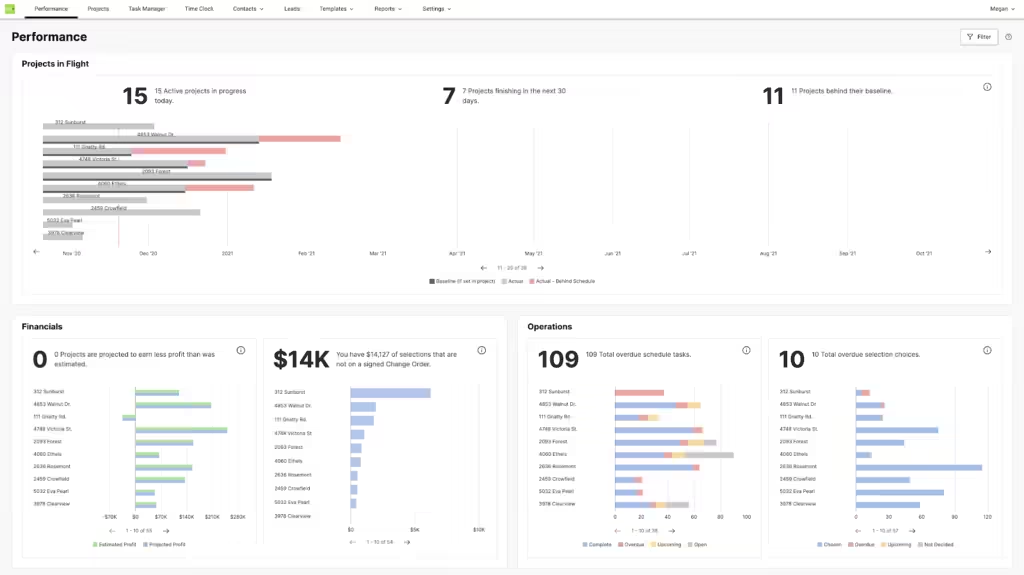
Figure: CoConstruct software dashboard.
Key Features of CoConstruct Software
Project Management and Scheduling
CoConstruct’s project management tools cover the essentials — scheduling, task assignment, and progress tracking — presented through a clean, organized interface. What sets it apart is how these tools connect to client and team communication in real time. A schedule change doesn’t just update a Gantt chart; it can trigger notifications to the relevant parties automatically.
The ability to build and save custom project templates is particularly valuable for contractors running multiple similar builds. It cuts setup time significantly and helps maintain consistency across jobs.
Managing Contractors and Subcontractors with CoConstruct
One area where CoConstruct earns its keep on busy job sites is subcontractor management. The platform lets you assign tasks directly to subs, track their progress, and tie their work to specific budget line items. The built-in time clock feature allows field crews and subcontractors to log hours from the mobile app — keeping timesheets digital and reducing end-of-week reconciliation headaches.
A common question from mobile-heavy crews is: how much data does the CoConstruct app time clock use? The time clock itself is relatively lightweight in terms of data consumption — it’s primarily logging timestamps and syncing small data packets. That said, using the app for photo uploads or document access will use meaningfully more data, so crews on limited mobile plans should be mindful of that.
Document Management
CoConstruct keeps all project documents — contracts, blueprints, change orders, invoices — in a single centralized location. Files are accessible to the right people at the right time, with role-based permissions that control who sees what.
The document approval workflow is streamlined enough that it actually gets used, which is more than can be said for some platforms where approval features exist but slow things down in practice.
Financial Management and QuickBooks Integration
The financial tools in CoConstruct are built around the realities of residential project budgeting. You can set up detailed budgets, track expenses against them in real time, and generate cost reports and forecasts on demand.
The integration with QuickBooks is one of the platform’s most-cited strengths. For contractors already running their books in QuickBooks, being able to sync project financials directly — rather than re-entering data manually — saves real time and reduces the risk of errors. It’s not a perfect integration (more on that in the challenges section), but for most users it works reliably.
Client Communication and the Client Portal
CoConstruct’s client portal is one of its most distinctive features. Rather than managing client communication across email threads and phone calls, you can route everything through the platform. Clients can view project updates, review and approve change orders, and send messages directly through their portal — all logged in one place.
This does more than save time. It creates a clear record of decisions and approvals, which matters when disputes arise. Clients who might otherwise feel kept in the dark tend to feel more engaged when they can check progress on their own schedule.
CoConstruct Interface: Is It Easy to Learn?
This is one of the most common questions from contractors evaluating the platform: is CoConstruct easy to learn?
The honest answer is: easier than most, but not immediate. The CoConstruct interface is clean and logically organized — the dashboard puts the most-used tools front and center, and the navigation doesn’t require digging through nested menus to find basic functions. Most users with reasonable software literacy can get comfortable with day-to-day tasks within a few days.
The fuller answer is that the platform has a lot of capability, and using it well takes longer than using it adequately. Templates, custom workflows, financial setup, and client portal configuration all require an initial investment of time. Teams that push through that setup phase typically get strong returns. Teams that skip it often feel like the software is more complicated than it needs to be.
The mobile app mirrors the desktop experience closely, which helps field staff who don’t want to learn a separate interface. Photo uploads, schedule updates, time logging, and team messaging are all available on mobile without a stripped-down experience.
Integrations and Customization
CoConstruct integrates with QuickBooks for accounting and supports connections to tools like Dropbox for file management. For contractors who live in those ecosystems, the integrations reduce friction considerably.
Beyond integrations, the customization options are genuinely broad. You can configure project templates, set up personalized workflows, and even adjust branding within the platform. For contractors who want the software to reflect how they actually work — rather than forcing their workflow to match the software’s defaults — that flexibility is valuable.
The flip side: the depth of customization can be overwhelming during onboarding. New users sometimes spend more time configuring than building. Starting with CoConstruct’s default templates and adjusting gradually tends to work better than trying to customize everything upfront.
CoConstruct vs. Other Construction Management Software
CoConstruct vs. BuilderTrend
BuilderTrend is the most direct competitor to CoConstruct in the residential space. Both platforms cover scheduling, client communication, document management, and financial tracking. The differences are more about emphasis and fit than fundamental capability gaps.
CoConstruct tends to be the preference among custom home builders and high-end remodelers who want tighter client integration and more control over the bidding and selection process. BuilderTrend often edges ahead for volume builders or contractors running larger crews, where its scheduling and CRM tools feel more at home.
CoConstruct vs. Procore
Procore operates at a different scale. It’s built for commercial construction and larger general contractors, and it shows — in the feature depth, the pricing, and the onboarding complexity. Most residential custom builders will find CoConstruct a significantly better fit unless they’re managing projects at a scale where Procore’s enterprise tools become necessary.
Where CoConstruct Stands Out
The residential focus is the real differentiator. CoConstruct isn’t trying to serve every segment of the construction industry — it’s built around the specific workflow of custom builds and remodels, from initial client selections through final punch list. That focus translates into features that actually fit how residential contractors work, rather than features that had to be adapted from a commercial context.
Pricing: What Does CoConstruct Cost?
CoConstruct uses a subscription-based pricing model, with plans that vary based on the number of active projects and users. The pricing is customizable enough that smaller operations aren’t paying for capacity they don’t need.
A free trial is available, which is worth taking advantage of before committing. The trial gives access to the full feature set, so you can run a real project through the system — not just click through a demo — before deciding.
Exact pricing isn’t published on coconstruct.com at a flat rate, so the best path is to contact their team directly or start with the trial to get a quote based on your project volume.
Pros and Cons of CoConstruct
Pros
- Purpose-built for residential custom builders and remodelers
- Integrated client portal reduces communication friction and creates a clear approval record
- QuickBooks integration handles financial syncing reliably for most users
- Mobile app is well-designed and mirrors the desktop experience
- Subcontractor and time tracking tools reduce manual timesheet work
- Flexible templates and workflows that can be tailored to your process
Cons
- Learning curve is real — full setup takes time and commitment
- Some integrations require troubleshooting, especially with third-party tools beyond QuickBooks
- Depth of customization can overwhelm new users during onboarding
- Pricing isn’t transparent on the website — requires a direct quote
- Data usage on mobile can add up if crews are uploading photos frequently on limited plans
Common Challenges with CoConstruct (And How to Manage Them)
The learning curve is the most frequently cited frustration. The CoConstruct interface is intuitive for basic use, but the platform’s full capability — especially financial setup, template configuration, and client portal customization — requires a real time investment. Teams that go through proper onboarding, including CoConstruct’s own training resources, consistently report better outcomes than those who try to figure it out independently.
Integration friction comes up most often with tools outside the core QuickBooks connection. Some users have reported inconsistencies when syncing CoConstruct with other third-party platforms. If a clean integration with a specific tool is critical to your workflow, it’s worth testing that connection during your free trial before committing.
Customization overload is a genuine onboarding trap. The breadth of options is ultimately a strength, but new users who try to configure everything from day one often get frustrated before they see the payoff. A phased approach — start with defaults, add customization as you identify needs — works better in practice.
Conclusion
CoConstruct is a well-built, purpose-focused construction project management software that earns its reputation among custom builders and remodelers. Its strongest assets — the client portal, QuickBooks integration, residential-specific workflow design, and solid mobile experience — address the real pain points of managing custom residential projects rather than generic construction scenarios.
It’s not the easiest platform to set up, and it’s not the right fit for every contractor. If you’re running large commercial projects or need deep CRM and sales pipeline tools, BuilderTrend or Procore may serve you better. But if you’re a custom builder or remodeler who wants a single platform to manage schedules, clients, documents, subcontractors, and finances — and you’re willing to invest in proper onboarding — CoConstruct is one of the strongest options in its category.
The free trial is the right starting point. Put a real project through it, test the client portal with an actual client, and connect it to your QuickBooks account. That hands-on time will tell you more than any review can.
Frequently Asked Questions About CoConstruct
What is CoConstruct? CoConstruct is a cloud-based construction project management software designed specifically for custom home builders and remodelers. It handles project scheduling, document management, client communication, financial tracking, and subcontractor coordination in one integrated platform.
How does CoConstruct improve project management? It gives everyone — builders, clients, and subs — real-time access to the same project information. Schedule updates, document approvals, and change orders happen in one place, which reduces the back-and-forth that typically slows residential projects down.
Is CoConstruct easy to learn? The interface is cleaner and more intuitive than many competitors, and most users can handle basic functions within a few days. That said, getting full value from the platform — templates, financial tools, client portal — takes a more deliberate onboarding effort.
How does CoConstruct handle document management? All project documents are stored centrally with role-based access controls. Contracts, blueprints, change orders, and invoices are accessible to the right people, and an approval workflow keeps everyone working from current versions.
What are CoConstruct’s pricing options? CoConstruct uses subscription-based pricing that scales with project volume and users. A free trial is available. For specific pricing, contact the team at coconstruct.com directly.
Can CoConstruct integrate with other software? Yes — QuickBooks integration is the most robust and widely used. The platform also connects with tools like Dropbox. Some third-party integrations require additional configuration and occasional troubleshooting.
What are the common challenges with CoConstruct? The main ones are the learning curve during initial setup, occasional friction with third-party integrations, and the depth of customization options — which is valuable long-term but can feel overwhelming at the start.
How does CoConstruct handle subcontractor management? You can assign tasks to subcontractors, track their progress, and tie their work to budget line items. The mobile time clock lets field crews log hours directly from the app, reducing manual timesheet reconciliation.
Disclaimer: The information in this article is based on firsthand experience and industry knowledge. It is intended for informational purposes only and does not constitute professional advice. Features and pricing may change — visit www.coconstruct.com for the most current information.
